Part 2 of a series
How the Unit Record Fills In: Nameplate Photos to Superheat and Subcooling
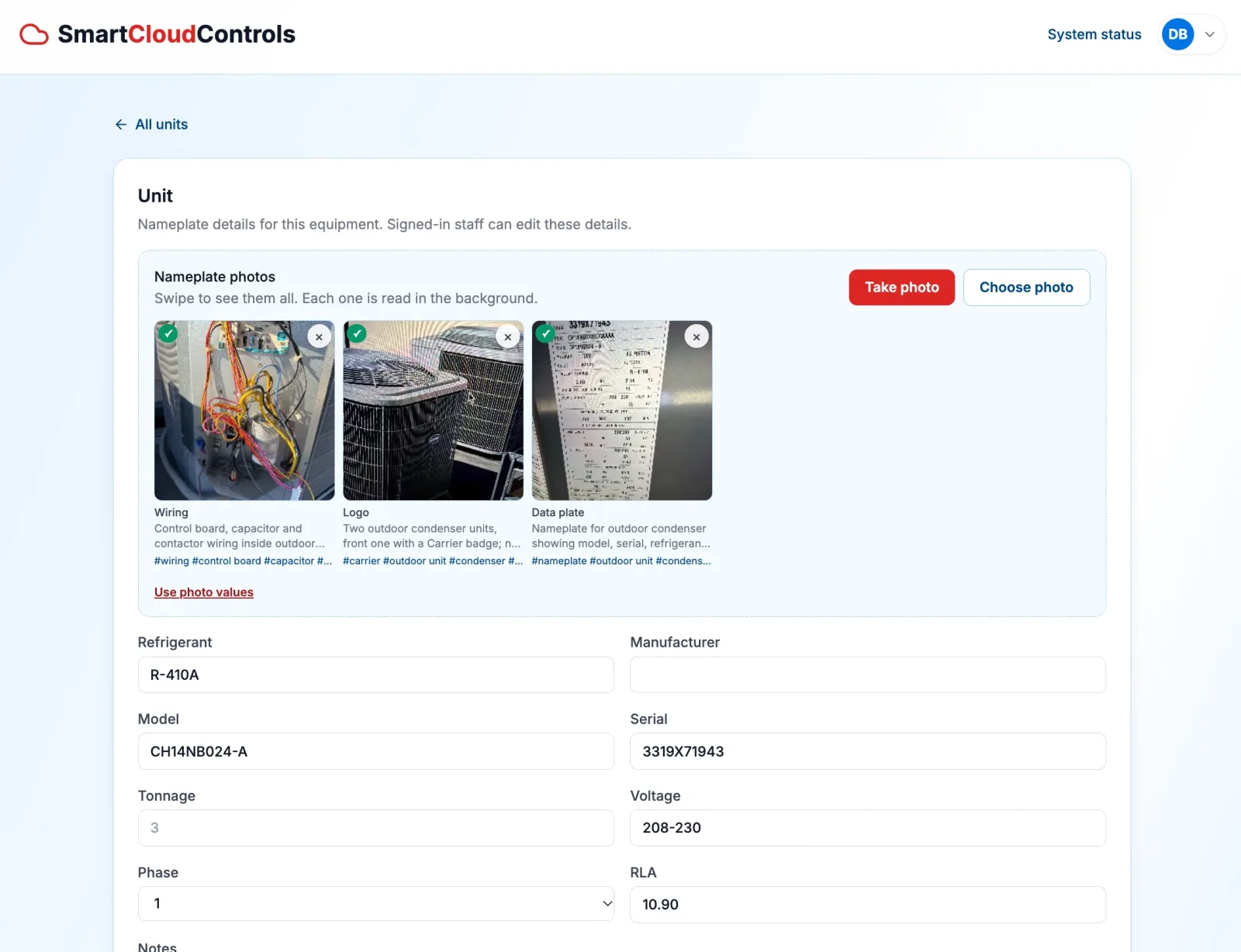
This is part two of a series about converting our monitoring device into a diagnostic setup. Part one covered what a diagnostic call records and how that data reaches the team. This one covers the other half of the record: how the unit itself gets described, and why that description has to exist before a reading can be interpreted.
The photos come first
Before any reading is interpreted, the technician photographs the equipment. Not only the data plate: the wiring inside the control panel, the badge on the condenser, the way the units sit on the roof, anything that looks wrong.
Each photo is a fact about the unit. A data plate carries the model, serial number, tonnage, voltage, phase, rated load amps, and refrigerant. A wiring photo shows what has been changed or repaired. A badge photo settles the manufacturer. Together they describe the system that the readings will belong to.
The read happens in the background
Nobody waits for the photos to be understood. Each image is downscaled and saved as soon as it is taken, and the read runs after the upload has returned. By the time the panel is closed, the checks are appearing next to the thumbnails.
Every photo comes back with a short caption and a handful of tags — the brand, the component, the condition. The caption is written for the technician rather than for a report: one line saying what the photo shows.
Only the data plate fills the fields
The system sorts each photo by what it shows: nameplate, logo, wiring, installation, damage, or something else. Only a data plate fills in the unit’s fields.
From that plate come refrigerant, manufacturer, model, serial number, tonnage, voltage, phase, and RLA. They are staged next to the form and applied in one action, so the technician can compare the read against what is already on file before it replaces anything.
The refrigerant is the key
Pressure and temperature on their own do not say much. A high-side reading is high or low depending on the refrigerant and the conditions it was taken in. Superheat and subcooling are what turn those readings into something a diagnosis can use, and both of them depend on knowing the refrigerant.
That used to be a manual step: select the refrigerant, select the unit, and only then do the numbers mean anything. With the plate read, the refrigerant is already on the unit’s record. The system converts pressure to saturation temperature from there and reports superheat and subcooling without anyone picking a refrigerant by hand.
A record that keeps improving
A unit keeps up to twenty photos, newest first, and any of them can be re-read or removed. A second visit adds new photos to the same record, so the unit is described more completely over time instead of being entered again from scratch.
The context photos have a second use. They stay with the unit and become material for the later evaluation, where the readings and the equipment are considered together.
What’s next in the series
The next post covers what happens once the record is complete: how readings are weighed against the nameplate, and what a diagnosis looks like when the equipment data and the recorded data arrive together. If you want this running on a system, get in touch.
Want this on a system?
Tell us what the system is doing and we will walk you through what a monitored diagnostic call looks like.